U++ framework
Do not panic. Ask here before giving up.

Home » Developing U++ » UppHub » GraphDraw/GraphCtrl
Re: GraphDraw/GraphCtrl [message #54399 is a reply to message #54398] Sun, 12 July 2020 12:18 Go to previous messageGo to next message
Didier is currently offline  Didier
Messages: 740
Registered: November 2008
Location: France
Contributor
As for the warning, MSVC is probably winning about this

// GraphElements are NOT COPYABLE nor MOVEABLE
GraphElementParent(GraphElementParent&&) = delete;
GraphElementParent(const GraphElementParent&&) = delete;
GraphElementParent(GraphElementParent& ) = delete;
GraphElementParent(const GraphElementParent& ) = delete;


Since I don't have access to a valid MSVC, just tell what to put (normally this is valid code Confused )
Re: GraphDraw/GraphCtrl [message #54400 is a reply to message #54398] Sun, 12 July 2020 13:22 Go to previous messageGo to next message
Pradip is currently offline  Pradip
Messages: 109
Registered: February 2019
Location: India
Experienced Member
Oh, this is going to be a challenge. I've checked again, I still can't run even 14429, McAfee Sad

Regards,
Pradip
Re: GraphDraw/GraphCtrl [message #54414 is a reply to message #54399] Tue, 14 July 2020 17:52 Go to previous messageGo to next message
Pradip is currently offline  Pradip
Messages: 109
Registered: February 2019
Location: India
Experienced Member
Didier wrote on Sun, 12 July 2020 15:48
As for the warning, MSVC is probably winning about this

// GraphElements are NOT COPYABLE nor MOVEABLE
GraphElementParent(GraphElementParent&&) = delete;
GraphElementParent(const GraphElementParent&&) = delete;
GraphElementParent(GraphElementParent& ) = delete;
GraphElementParent(const GraphElementParent& ) = delete;


Since I don't have access to a valid MSVC, just tell what to put (normally this is valid code Confused )

I think this we can ignore. In MSVS community also someone reported this as an issue.


Regards,
Pradip
Re: GraphDraw/GraphCtrl [message #54417 is a reply to message #54394] Tue, 14 July 2020 20:45 Go to previous messageGo to next message
Pradip is currently offline  Pradip
Messages: 109
Registered: February 2019
Location: India
Experienced Member
Didier wrote on Sun, 12 July 2020 03:01

I just uploaded the latest version of the code.

Hello Didier!

Guess what, I can now run 14679! McAfee didn't cry about it Laughing

Modified my code and successfully eliminated all errors. Now there are some new 'possible loss of data' warning, see the image. You can ignore 'multiple copy constructors specified' errors.
index.php?t=getfile&id=6151&private=0


Regards,
Pradip
Re: GraphDraw/GraphCtrl [message #54418 is a reply to message #54417] Tue, 14 July 2020 23:18 Go to previous messageGo to next message
Didier is currently offline  Didier
Messages: 740
Registered: November 2008
Location: France
Contributor
Hello Pradip,

Quote:
Guess what, I can now run 14679! McAfee didn't cry about it

Great news !
You should now see a good performance boost du to all the optimization work Mirek did using intrinsics ( Thanks Mirek Smile )

For the other warnings, they are not from my packages ... so I can't do anything about it
ScatterDraw, which is now part of Uppsrc was written by Koldo ==> you need to post him a request for correction in this thread :
https:// www.ultimatepp.org/forums/index.php?t=thread&frm_id=93&a mp;a mp;

[Updated on: Tue, 14 July 2020 23:31]

Report message to a moderator

Re: GraphDraw/GraphCtrl [message #54420 is a reply to message #54418] Wed, 15 July 2020 09:45 Go to previous messageGo to next message
koldo is currently offline  koldo
Messages: 3458
Registered: August 2008
Senior Veteran
Dear Pradip, dear Didier

I cannot reproduce the warnings in DataSource.h.
Could you indicate me which compiler has been used and how DataSource.h is included?


Best regards
Iñaki
Re: GraphDraw/GraphCtrl [message #54421 is a reply to message #54420] Wed, 15 July 2020 09:57 Go to previous messageGo to next message
Pradip is currently offline  Pradip
Messages: 109
Registered: February 2019
Location: India
Experienced Member
Dear Koldo, I have used MSVS17 compiler.

Dear Didier, please advise how you have used ScatterDraw in GraphDraw


Regards,
Pradip
Re: GraphDraw/GraphCtrl [message #54422 is a reply to message #54420] Wed, 15 July 2020 09:57 Go to previous messageGo to next message
koldo is currently offline  koldo
Messages: 3458
Registered: August 2008
Senior Veteran
Well, I think I have found and fixed the warnings,
Please check them (I cannot Rolling Eyes )


Best regards
Iñaki
Re: GraphDraw/GraphCtrl [message #54423 is a reply to message #54422] Wed, 15 July 2020 10:01 Go to previous messageGo to next message
Pradip is currently offline  Pradip
Messages: 109
Registered: February 2019
Location: India
Experienced Member
Dear Koldo,

Thanks! Should I check tomorrow in tonight's nightly build then?


Regards,
Pradip
Re: GraphDraw/GraphCtrl [message #54424 is a reply to message #54423] Wed, 15 July 2020 12:58 Go to previous messageGo to next message
koldo is currently offline  koldo
Messages: 3458
Registered: August 2008
Senior Veteran
It is already uploaded and available in svn.

Best regards
Iñaki
Re: GraphDraw/GraphCtrl [message #56028 is a reply to message #54424] Sat, 16 January 2021 07:08 Go to previous messageGo to next message
Pradip is currently offline  Pradip
Messages: 109
Registered: February 2019
Location: India
Experienced Member
Hello Didier,

Hope you are doing fine Smile

I tried to compile GraphCtrl_Demo in UPP version 15260 and found some errors in clang compiler; it is complaining about VectorDouble and ArrayDouble. Please see the image.

What should be done?
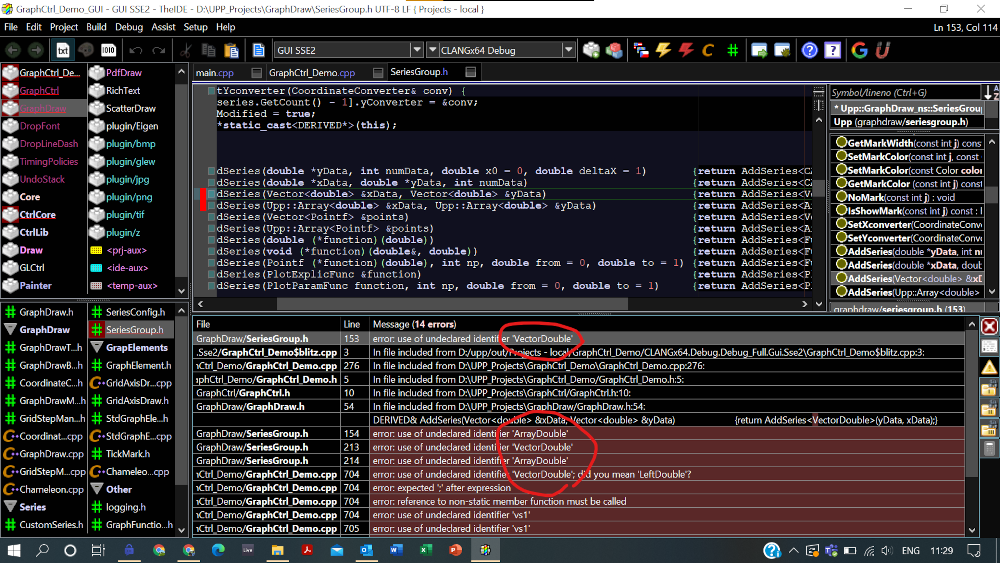
index.php?t=getfile&id=6339&private=0


Regards,
Pradip

[Updated on: Sat, 16 January 2021 08:02]

Report message to a moderator

Re: GraphDraw/GraphCtrl [message #56029 is a reply to message #56028] Sat, 16 January 2021 08:04 Go to previous messageGo to next message
Pradip is currently offline  Pradip
Messages: 109
Registered: February 2019
Location: India
Experienced Member
Okay I got it. Changes in ScatterDraw:

VectorDouble -> VectorXY
ArrayDouble -> ArrayXY

Didier you may please update GraphCtrl accordingly


Regards,
Pradip

[Updated on: Sat, 16 January 2021 08:05]

Report message to a moderator

Re: GraphDraw/GraphCtrl [message #56032 is a reply to message #56029] Sat, 16 January 2021 20:57 Go to previous messageGo to next message
Didier is currently offline  Didier
Messages: 740
Registered: November 2008
Location: France
Contributor
Hello Pradip,

All is fine here thanks

I have a version which contains the necessary corrections ... but also cmes with a lot of other modifications : corrections and enhancements.

The modifications are the following:
  • The main mofifications aim to allow easy overriding of the properties editors (so that they can be fully customized ( my graphic designer tallent is very very bad Wink )
    To achieve this I had to kick out inheritance in Style classes (simpler this way) ==> No inheritance at all must be used at all !
    ==> this implies the StyleDefault() methods may need update
    ==> the main properties window (the one accessible when hovering graph area now displays all available properties as TABs)
  • I also did some renaming (very few) where needed
    One ranming was to follow a simple naming convention : when in a GraphElement class, getter an setter should be named GetElement...() SetElement...() ) ==> so no confusion with GraphDraw / GraphCtrl methods
  • Bug corrections


Here is the updated package

[Updated on: Sat, 16 January 2021 21:00]

Report message to a moderator

Re: GraphDraw/GraphCtrl [message #56080 is a reply to message #56032] Thu, 21 January 2021 19:55 Go to previous messageGo to next message
Didier is currently offline  Didier
Messages: 740
Registered: November 2008
Location: France
Contributor
Hello again Pradip,

While reconnecting with code (which I didn't work on for some time now : other things to do Wink )
I just noticed I forgot to talk about some important modifications which I was working on and are not finished yet (but are isolated from rest of code for the moment and so normally will not bother you)
==> I was working on making ScatterDraw compatibility encapsulated in a CustomDataSource so that this could be optional (I like it when embedding all libraries is not mandatory Wink ) ... This would have the could side effect of moving all ScatterDraw dedicated code to this CustomDataSource and thus cleaning GraphDraw.

[Updated on: Thu, 21 January 2021 23:06]

Report message to a moderator

Re: GraphDraw/GraphCtrl [message #56508 is a reply to message #56080] Sat, 20 March 2021 05:34 Go to previous messageGo to next message
Pradip is currently offline  Pradip
Messages: 109
Registered: February 2019
Location: India
Experienced Member
Hello Didier!

Sorry for not replying to you for a while! Me too wasn't working with the code for sometime, got back to them recently. Will try the new GraphCtrl package after some days, will keep the points you mentioned in mind for then.

Ahh you have worked on making things better, can't wait to see them Very Happy
By any chance could you implement the PaintOne() (not sure if I remember the name right), for highlighting one data point for say selection or so?


Regards,
Pradip
Re: GraphDraw/GraphCtrl [message #56517 is a reply to message #56508] Sat, 20 March 2021 20:48 Go to previous messageGo to next message
Didier is currently offline  Didier
Messages: 740
Registered: November 2008
Location: France
Contributor
Hello Pradip,

I recommend you wait a little bit more before synching.

I enhanced support for custom series, I did the following changes:
  • Introduced GraphSeries class : it's a proxy to the data that also nows takes care of drawing and editor dialog
  • Did a clean separation for custom series ==> the series can now be in other packages
  • Added legend management for all series (even custom series) Smile
  • Added properties editor dialog management for all series (even custom series) Smile . A custom serie can come with it's properties dialog
  • Did some packaging : isolated existing Series in a dedicated packages ==> this allows to choose exactly which kind of serie you will use and limit minimal dependancies
  • Did some renaming (CustomDataSource was to confusing whith the ScatterDraw class)
[*] ScatterSerie interface changed a (very little bit) : preperties are not available directly at GraphCtrl level, you need to get access to the GraphSeries (so just one simple modification that can be done with search/replace)


I reached a good level, but some other changes aren't done yet and still very dirty (example I tried to isolate GraphElements in different packages and succeded .... but this makes to many packages, so I rolled back

With these enhancements, you could contribute you're series very simply Smile

[Updated on: Sat, 20 March 2021 20:53]

Report message to a moderator

Re: GraphDraw/GraphCtrl [message #56528 is a reply to message #56517] Mon, 22 March 2021 06:26 Go to previous messageGo to next message
Pradip is currently offline  Pradip
Messages: 109
Registered: February 2019
Location: India
Experienced Member
Hello Didier,

Sure, I'll wait until you finish working at your end, and I'm sure it will be very cool when you are done Very Happy

Looking forward to it!


Regards,
Pradip
Re: GraphDraw/GraphCtrl [message #56557 is a reply to message #56528] Thu, 25 March 2021 05:43 Go to previous messageGo to next message
Pradip is currently offline  Pradip
Messages: 109
Registered: February 2019
Location: India
Experienced Member
Hello Didier,

While trying to print the gantt chart in a report, please advise if using the GetImage() method is best for this purpose?

Thanks in advance Smile


Regards,
Pradip
Re: GraphDraw/GraphCtrl [message #56562 is a reply to message #56557] Thu, 25 March 2021 19:16 Go to previous messageGo to next message
Didier is currently offline  Didier
Messages: 740
Registered: November 2008
Location: France
Contributor
Hello Pradip,

The GetImage() method is intended exactly for that Wink

I recommend you use one of the following GetImage(...) methods (search in GraphDraw package) :
		Image GetImage( Size size, Color backGndColor = Upp::White(), const int scale = 1 );
		Image GetImage(Size size, const int scale = 1 ) { return GetImage(size, White(), scale ); }
		inline Image GetImage(const int scale=1)        { return GetImage( _ctrlRect.Size()*scale, scale ); }
		inline Image GetImage(Color backGndColor, const int scale=1) { return GetImage( _ctrlRect.Size()*scale, backGndColor, scale ); }


The 'scale' parameter is intended to make a high resolution image intended for better rendering in reports (and printing).
Basically reportImageSize = screenImageSize * scale and it doens't scale anything else so it works as if you had a bigger screen.

If you want a predefined size for you're repport, just use GetImage(size, scale)

I use it regularly in my repports.

Take a look at the 'copy' action in context menu in graph ==> it will copy the graph to clipboard while applying a scale=3 (3 is default copy ratio)

[Updated on: Thu, 25 March 2021 19:19]

Report message to a moderator

Re: GraphDraw/GraphCtrl [message #56572 is a reply to message #56562] Fri, 26 March 2021 06:19 Go to previous messageGo to next message
Pradip is currently offline  Pradip
Messages: 109
Registered: February 2019
Location: India
Experienced Member
Thankssss Didier! Very Happy

Regards,
Pradip
Re: GraphDraw/GraphCtrl [message #56646 is a reply to message #56572] Wed, 31 March 2021 10:02 Go to previous messageGo to next message
Pradip is currently offline  Pradip
Messages: 109
Registered: February 2019
Location: India
Experienced Member
Hello Didier,

While working for printing the gantt chart, found that these functions need const access to scale.

void GanttXGridAxisDraw::GanttGridStepCalcCbk(GridStepManager& gridStepManager,
	CoordinateConverter& coordConv){

void GanttXGridAxisDraw::PaintHGrid(Draw& dw, int yRange, const_GridStepIterator iter,
	const_GridStepIterator endIter) {


void GanttYGridAxisDraw::PaintVGrid(Draw& dw, int xRange, const_GridStepIterator iter,
		const_GridStepIterator endIter) {


GanttXGridAxisDraw::GanttGridStepCalcCbk needs scale to show the dynamic grid on both screen and print correctly, Please see the attached PDF which will illustrate this clearly.

Paint*Grid needs scale to draw the grids with right thickness on both screen and print.

Please advise.


Regards,
Pradip
Re: GraphDraw/GraphCtrl [message #56652 is a reply to message #56646] Wed, 31 March 2021 22:22 Go to previous messageGo to next message
Didier is currently offline  Didier
Messages: 740
Registered: November 2008
Location: France
Contributor
Hello Pradip,

You are wright !
The scale parameter is missing.
I will add it right away so it will be included in next version
Re: GraphDraw/GraphCtrl [message #56653 is a reply to message #56652] Wed, 31 March 2021 22:32 Go to previous messageGo to next message
Didier is currently offline  Didier
Messages: 740
Registered: November 2008
Location: France
Contributor
I added 'scale' to PaintVGrid() and PaintHGrid() : was trivial

But for the other one, I have to look further into it : it's not trivial
Re: GraphDraw/GraphCtrl [message #56654 is a reply to message #56653] Thu, 01 April 2021 06:45 Go to previous messageGo to next message
Pradip is currently offline  Pradip
Messages: 109
Registered: February 2019
Location: India
Experienced Member
Thanks a lot Didier!

Please send me the package once you are done, I'll attempt to sync.


Regards,
Pradip
Re: GraphDraw/GraphCtrl [message #56727 is a reply to message #56654] Wed, 07 April 2021 14:51 Go to previous messageGo to next message
Didier is currently offline  Didier
Messages: 740
Registered: November 2008
Location: France
Contributor
Hello Pradip,

Here is first version (not 100% finished, but what I wanted to see working is now OK)
There will be some more renaming to come (not to much I hope) but you can satrt with this version.
The main additions since you're last sync are:


  • Introduced GraphSeries class : it's a proxy to the data that also takes care of drawing and editor dialog construction
  • Did a clean separation for custom series ==> the series can now be in other packages
  • Added legend management for all series (even custom series) Smile
  • Added properties editor dialog management for all series (even custom series) Smile . A custom GraphSerie can come with it's properties dialog and it can be changed application wide with static methods SetDefaultXxxx() (just like Chameleon)
  • Did some packaging : isolated existing Series in a dedicated packages ==> this allows to choose exactly which kind of serie you will use and limit minimal dependencies (I added a GraphSerie directory intended to contain all the GraphSerie packages)
  • Did some renaming (CustomDataSource was to confusing whith the ScatterDraw class)
  • NEW : Changed GrahElement properties editors management : you can now change application wide the editor of a GraphElement with static methods SetDefaultXxxx() (just like Chameleon) (This enhances Styling capacities quite easily)
  • NEW : did some more simplifications
  • NEW : did some more renaming


All the modifications you requested have also been added Smile
But after thinking about it, maybe you have a bug : the image copied to clipboard is supposed to look exactly the same as the one on the screen but with higher resolution so the number of grid lines should not change and you should not have the behaviour you see in the image you shared
Maybe you could share with the code of you're GridAxis manager ?


[EDIT] : removed attached file, new version available further

[Updated on: Tue, 27 April 2021 23:36]

Report message to a moderator

Re: GraphDraw/GraphCtrl [message #56728 is a reply to message #56727] Wed, 07 April 2021 18:44 Go to previous messageGo to next message
Didier is currently offline  Didier
Messages: 740
Registered: November 2008
Location: France
Contributor
Here the demo application I use to do some testing of GraphCtrl

[EDIT] : removed attached file, new version available further

[Updated on: Tue, 27 April 2021 23:36]

Report message to a moderator

Re: GraphDraw/GraphCtrl [message #56730 is a reply to message #56728] Wed, 07 April 2021 21:33 Go to previous messageGo to next message
Klugier is currently offline  Klugier
Messages: 1117
Registered: September 2012
Location: Poland, Kraków
Senior Contributor
Hello Dider,

Did you consider publishing GraphCtrl on UppHub? I think it would be good addition.

Klugier


U++ - one framework to rule them all.

[Updated on: Wed, 07 April 2021 21:34]

Report message to a moderator

Re: GraphDraw/GraphCtrl [message #56731 is a reply to message #56730] Wed, 07 April 2021 22:33 Go to previous messageGo to next message
Didier is currently offline  Didier
Messages: 740
Registered: November 2008
Location: France
Contributor
Hello Klugier.

Yes I have this in mind.
Just did find time to do it and frankly, some clear intructions are missing
Putting code into github is quite easy but I don't know where to put the description files which upphub uses
Re: GraphDraw/GraphCtrl [message #56733 is a reply to message #56731] Thu, 08 April 2021 08:53 Go to previous messageGo to next message
Oblivion is currently offline  Oblivion
Messages: 1266
Registered: August 2007
Senior Contributor
Hello Didier,
Quote:

Putting code into github is quite easy but I don't know where to put the description files which upphub uses


You don't need to edit or create any description files. IF your module/ctrl isn't already on a public Github repo, just create a repo following these instructions and notify us. It's our responsibility to handle the rest. Smile

Example of the directory structure to be created

If you have more than one closely related packages, such as GraphDraw and GraphCtrl, you can put them both into the same root directory, e.g.

GraphDraw
GraphCtrl
examples,
test
autotest
README.(md/qtf/or plain text)
LICENSE (md/or plain text)


If you have any questions let us know.


Best regards,
Oblivion


[Updated on: Thu, 08 April 2021 09:13]

Report message to a moderator

Re: GraphDraw/GraphCtrl [message #56734 is a reply to message #56727] Thu, 08 April 2021 09:49 Go to previous messageGo to next message
Pradip is currently offline  Pradip
Messages: 109
Registered: February 2019
Location: India
Experienced Member
Hello Didier!

Wonderful Smile , I'll download the package and will attempt to sync.

Also uploading the full CustomGantt package. The reason why I'm getting a different grid density between screen and print is:

Please see GanttXGridAxisDraw::GanttGridStepCalcCbk, where I'm deciding the grid mode and in GanttXGridAxisDraw::FormatAsDateCbk, based on the grid mode, formatting the axis. I've enclosed a PDF showing different grid modes as displayed.

In GanttXGridAxisDraw::GanttGridStepCalcCbk, in the following lines (got those limits by trial), the limits must be multiplied by scale to render correct output on print.
	if(daySpacing > Zx(90)) gridMode = DAY;
	else if(daySpacing > Zx(30)) gridMode = LONG_WEEK;
	else if(daySpacing > Zx(17)) gridMode = SHORT_WEEK;
	else if(weekSpacing > Zx(70)) gridMode = LONG_MONTH;
	else if(weekSpacing > Zx(25)) gridMode = SHORT_MONTH;
	else if(monthSpacing > Zx(28)) gridMode = QUARTER;
	else if(yearSpacing > Zx(220)) gridMode = LONG_YEAR;


Regards,
Pradip
Re: GraphDraw/GraphCtrl [message #56738 is a reply to message #56734] Fri, 09 April 2021 06:37 Go to previous messageGo to next message
Pradip is currently offline  Pradip
Messages: 109
Registered: February 2019
Location: India
Experienced Member
Hello Didier,

The updated GraphCtrl needs AutoScroller, failing on compilation. Where can I get that package?


Regards,
Pradip
Re: GraphDraw/GraphCtrl [message #56747 is a reply to message #56738] Fri, 09 April 2021 14:07 Go to previous messageGo to next message
Didier is currently offline  Didier
Messages: 740
Registered: November 2008
Location: France
Contributor
Hello Pradip,

The autoscroller is part of UppHub, if you havea very recent version of Theide, it will be available.

[Updated on: Fri, 09 April 2021 16:39]

Report message to a moderator

Re: GraphDraw/GraphCtrl [message #56776 is a reply to message #56747] Thu, 15 April 2021 09:21 Go to previous messageGo to next message
Pradip is currently offline  Pradip
Messages: 109
Registered: February 2019
Location: India
Experienced Member
Hello Didier,

Please, help is needed while syncing!

How should I modify the following lines? They are failing in compilation Sad

struct GanttCtrlDefaultTypes {
	typedef GanttCtrlDefaultTypes                                                      Types;
	typedef GraphDraw_ns::CoordinateConverter                                          X1_TypeCoordConverter;
	typedef GraphDraw_ns::CoordinateConverter                                          Y1_TypeCoordConverter;
	typedef GraphDraw_ns::StdGridAxisECtrl<Types, GraphDraw_ns::GanttXGridAxisDraw >   X1_TypeGridAxisDraw;
	typedef GraphDraw_ns::StdGridAxisECtrl<Types, GraphDraw_ns::GanttYGridAxisDraw >   Y1_TypeGridAxisDraw;
	typedef GraphDraw_ns::StdLabelECtrl<Types,GraphDraw_ns::LabelElement>              TypeLabelElement;
	typedef GraphDraw_ns::StdLegendECtrl<Types, GraphDraw_ns::LegendElement >          TypeLegendElement;
	typedef GraphDraw_ns::StdBlankAreaECtrl<Types, GraphDraw_ns::BlankAreaElement >    TypeBlankElement;
	typedef GraphDraw_ns::DynamicMarkerECtrl< Types >                                  TypeMarkerElement;
};


Regards,
Pradip

[Updated on: Thu, 15 April 2021 09:27]

Report message to a moderator

Re: GraphDraw/GraphCtrl [message #56777 is a reply to message #56747] Thu, 15 April 2021 09:25 Go to previous messageGo to next message
Pradip is currently offline  Pradip
Messages: 109
Registered: February 2019
Location: India
Experienced Member
Didier wrote on Fri, 09 April 2021 17:37
The autoscroller is part of UppHub, if you havea very recent version of Theide, it will be available.

Thanks! Got the latest version of UPP and got the autoscroller too


Regards,
Pradip

[Updated on: Thu, 15 April 2021 09:29]

Report message to a moderator

Re: GraphDraw/GraphCtrl [message #56780 is a reply to message #56776] Thu, 15 April 2021 14:52 Go to previous messageGo to next message
Didier is currently offline  Didier
Messages: 740
Registered: November 2008
Location: France
Contributor
Hello Pradip,

Quote:
How should I modify the following lines? They are failing in compilation Sad

Code: [Select all] [Show/ hide]
struct GanttCtrlDefaultTypes {
typedef GanttCtrlDefaultTypes Types;
typedef GraphDraw_ns::CoordinateConverter X1_TypeCoordConverter;
typedef GraphDraw_ns::CoordinateConverter Y1_TypeCoordConverter;
typedef GraphDraw_ns::StdGridAxisECtrl<Types, GraphDraw_ns::GanttXGridAxisDraw > X1_TypeGridAxisDraw;
typedef GraphDraw_ns::StdGridAxisECtrl<Types, GraphDraw_ns::GanttYGridAxisDraw > Y1_TypeGridAxisDraw;
typedef GraphDraw_ns::StdLabelECtrl<Types,GraphDraw_ns::LabelElement > TypeLabelElement;
typedef GraphDraw_ns::StdLegendECtrl<Types, GraphDraw_ns::LegendElement > TypeLegendElement;
typedef GraphDraw_ns::StdBlankAreaECtrl<Types, GraphDraw_ns::BlankAreaElement > TypeBlankElement;
};


This is due to some simplifications ==> one of the template parameters was removed, it had become useless over time
So you just need to remove the 'Types' from the template declaration

'TYPES' template parameter isn't passed any more to GraphElements (they don't need this inforamtion)


Example:
typedef GanttCtrlDefaultTypes                                                      Types;
	typedef GraphDraw_ns::CoordinateConverter                                          X1_TypeCoordConverter;
	typedef GraphDraw_ns::CoordinateConverter                                          Y1_TypeCoordConverter;
	typedef GraphDraw_ns::StdGridAxisECtrl<GraphDraw_ns::GanttXGridAxisDraw >   X1_TypeGridAxisDraw;
	typedef GraphDraw_ns::StdGridAxisECtrl<GraphDraw_ns::GanttYGridAxisDraw >   Y1_TypeGridAxisDraw;
	typedef GraphDraw_ns::StdLabelECtrl<GraphDraw_ns::LabelElement>              TypeLabelElement;
	typedef GraphDraw_ns::StdLegendECtrl<GraphDraw_ns::LegendElement >          TypeLegendElement;
	typedef GraphDraw_ns::StdBlankAreaECtrl<GraphDraw_ns::BlankAreaElement >    TypeBlankElement;
	typedef GraphDraw_ns::DynamicMarkerECtrl                                  TypeMarkerElement;


Look at the GraphCtrlDefaultTypes declaration (there are some other simplifications : some don't have templates at all)

[Updated on: Thu, 15 April 2021 15:29]

Report message to a moderator

Re: GraphDraw/GraphCtrl [message #56841 is a reply to message #56780] Mon, 19 April 2021 15:14 Go to previous messageGo to next message
Pradip is currently offline  Pradip
Messages: 109
Registered: February 2019
Location: India
Experienced Member
Hello Didier,

The syncing is fully complete now. Addition of the scale parameter came very handy, thanks a lot! Enclosing comparison of screen and print outputs now, perfect!

While syncing, noted the following changes:

Changed this as you suggested, but noticed that the template name is TStdGridAxisECtrl and not StdGridAxisECtrl; similar changes in other related lines
//typedef GraphDraw_ns::StdGridAxisECtrl<Types, GraphDraw_ns::GanttXGridAxisDraw >   X1_TypeGridAxisDraw;
typedef GraphDraw_ns::TStdGridAxisECtrl<GraphDraw_ns::GanttXGridAxisDraw >   X1_TypeGridAxisDraw;


This needs package GraphSeries/SimpleJobSerie
//class GanttBarSeries : public CustomDataSource {
class GanttBarSeries : public SimpleJobSerie {


For chameleon; similar changes in other related lines
//ganttPrintStyle.x1AxisStyle.gridColor = WhiteGray();
ganttPrintStyle.x1AxisStyle.gdStyle.gridColor = WhiteGray();


In Ctor, this was bit of a surprise. The first line worked fine before in both modes, now works in debug but crashes in release. Changed line works in both.
//GetElementY1GridAxisDraw().SetAxisInverted(); // crashes in release mode!
GetElementY1GridAxisDraw().GetCoordConverter().SetInverted();


Finally, noticed that now ScatterDraw package is needed, which wasn't the case earlier.

It's an awesome experience, working with the GraphCtrl! Cheers Very Happy


Regards,
Pradip
Re: GraphDraw/GraphCtrl [message #56843 is a reply to message #56841] Mon, 19 April 2021 19:42 Go to previous messageGo to next message
Didier is currently offline  Didier
Messages: 740
Registered: November 2008
Location: France
Contributor
Hello Pradip,

Glad to here you succeded in syncing (hope it wasn't to much work Embarassed )

Quote:
Changed this as you suggested, but noticed that the template name is TStdGridAxisECtrl and not StdGridAxisECtrl; similar changes in other related lines

When I removed the TYPE template parameter from GraphElementCtrl i Noticed I could simplify things and define default types (that don't need templates)
This is why I added 'T' : it's shows it is the Template version
	typedef TStdGridAxisECtrl< GridAxisDraw >     StdGridAxisECtrl;
	typedef TStdLabelECtrl   < LabelElement>      StdLabelECtrl;
	typedef TStdLegendECtrl  < LegendElement>     StdLegendECtrl;
	typedef TStdBlankAreaECtrl<BlankAreaElement>  StdBlankAreaECtrl;
	typedef DynamicMarkerECtrl                    StdMarkerECtrl;


Quote:
This needs package GraphSeries/SimpleJobSerie
//class GanttBarSeries : public CustomDataSource {
class GanttBarSeries : public SimpleJobSerie {


You should have used :
class GanttBarSeries : public GraphSerie

Since CustomDataSource was renamed GraphSerie
SimpleJobSerie is just an example of a job serie


Quote:
In Ctor, this was bit of a surprise. The first line worked fine before in both modes, now works in debug but crashes in release. Changed line works in both.

//GetElementY1GridAxisDraw().SetAxisInverted(); // crashes in release mode!
GetElementY1GridAxisDraw().GetCoordConverter().SetInverted() ;

I will look into this, obviously there is a problem ...


Quote:
Finally, noticed that now ScatterDraw package is needed, which wasn't the case earlier

ScatterDraw was always necessary before: it was part of the dependecies of GraphDraw.
Now, after the laast modifications, if you don't use ScatterSeries in you're application ScatterDraw package is no more included (since it's not needed by application)
If you need ScatterSeries you need to make it a dependency of you're application package
This was done to limit dependencies to the minimum and prevent inclusion of unused packages

[Updated on: Mon, 19 April 2021 19:56]

Report message to a moderator

Re: GraphDraw/GraphCtrl [message #56844 is a reply to message #56843] Mon, 19 April 2021 21:01 Go to previous messageGo to next message
Didier is currently offline  Didier
Messages: 740
Registered: November 2008
Location: France
Contributor
Quote:
ScatterDraw was always necessary before

After verification isolating Scatter isn't completelly finished code doesn't compile without it Embarassed

I will have to finish this

[Updated on: Mon, 19 April 2021 21:02]

Report message to a moderator

Re: GraphDraw/GraphCtrl [message #56863 is a reply to message #56843] Fri, 23 April 2021 08:03 Go to previous messageGo to next message
Pradip is currently offline  Pradip
Messages: 109
Registered: February 2019
Location: India
Experienced Member
Hello Didier,

Didier wrote on Mon, 19 April 2021 23:12

Glad to here you succeded in syncing (hope it wasn't to much work Embarassed )

Amazing Very Happy! Though it took bit of a time, it was smooth sailing through the syncing! For custom series, now there are styles, mouse events, editor dialog (I'm still exploring) all thanks to your amazing work Shocked

Didier wrote on Mon, 19 April 2021 23:12

When I removed the TYPE template parameter from GraphElementCtrl i Noticed I could simplify things and define default types (that don't need templates)

It is simplified now

Didier wrote on Mon, 19 April 2021 23:12

You should have used :
class GanttBarSeries : public GraphSerie

Since CustomDataSource was renamed GraphSerie
SimpleJobSerie is just an example of a job serie

Got your point. Now I'm using:
class GanttBarSeries : public SimpleGraphSerie {

And removed dependency with SimpleJobSerie

Didier wrote on Mon, 19 April 2021 23:12

Quote:
In Ctor, this was bit of a surprise. The first line worked fine before in both modes, now works in debug but crashes in release. Changed line works in both.

//GetElementY1GridAxisDraw().SetAxisInverted(); // crashes in release mode!
GetElementY1GridAxisDraw().GetCoordConverter().SetInverted() ;

I will look into this, obviously there is a problem ...

Sure, I'll keep syncing with your updates.


Regards,
Pradip
Re: GraphDraw/GraphCtrl [message #56864 is a reply to message #56844] Fri, 23 April 2021 08:06 Go to previous messageGo to previous message
Pradip is currently offline  Pradip
Messages: 109
Registered: February 2019
Location: India
Experienced Member
Didier wrote on Tue, 20 April 2021 00:31

After verification isolating Scatter isn't completelly finished code doesn't compile without it Embarassed
I will have to finish this

Right, I'm not using ScatterDraw, so tried to remove it, then it didn't compile.
Just take your time and keep up the amazing work Smile


Regards,
Pradip
Previous Topic: Anboto/Surface updated
Next Topic: STEM4U Updates
Goto Forum:


Current Time: Mon May 11 08:25:18 GMT+2 2026

Total time taken to generate the page: 0.01876 seconds